MetalGraph
Visual shader editor for Metal
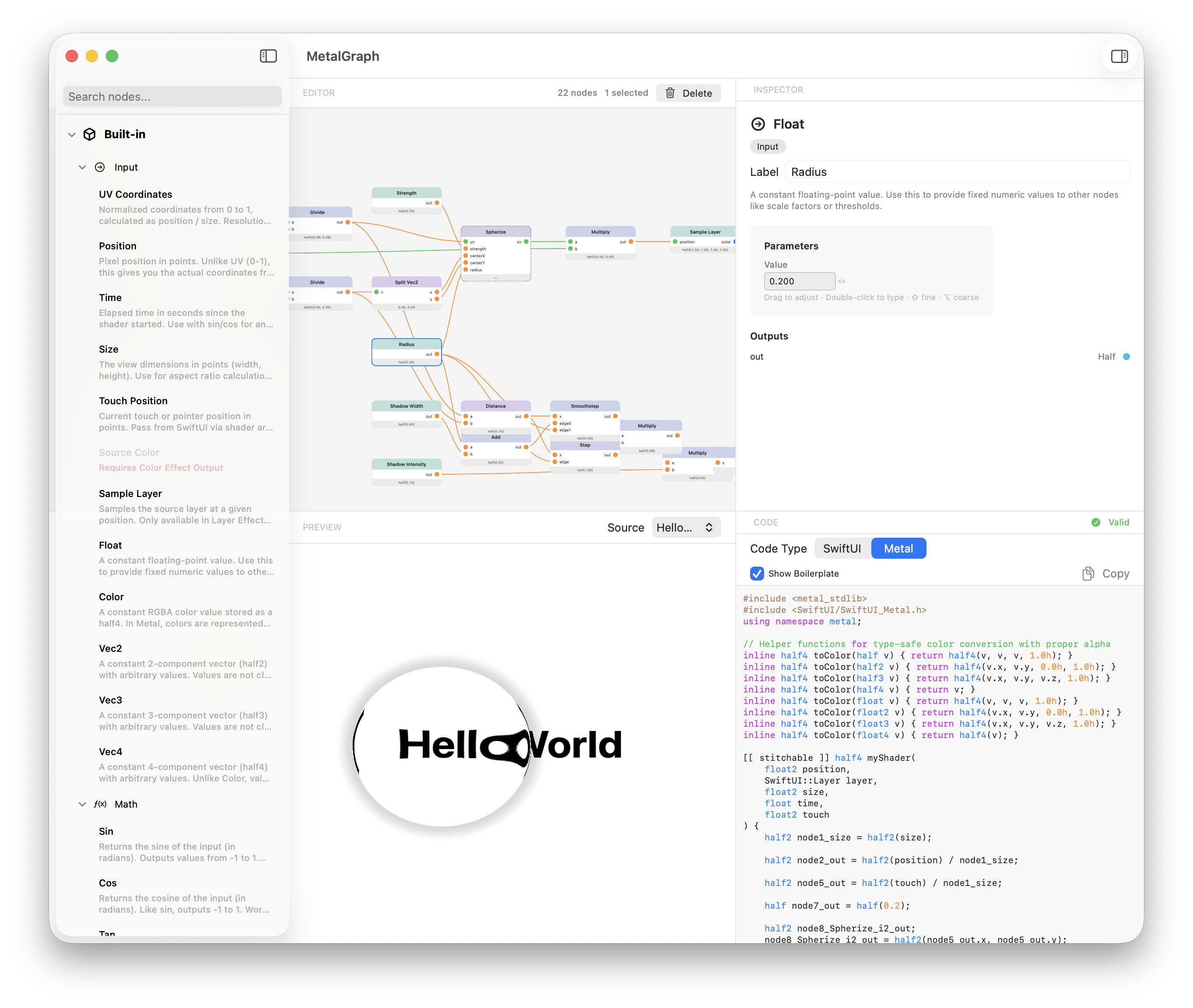
A macOS and iPad app for creating shaders through a node-based interface — no code required. Connect nodes, see instant results, export production-ready MSL.
Requires macOS 15.0 or iPadOS 18.0 or later.
What MetalGraph offers
From visual composition to production-ready code — everything you need to create shaders
Visual Node Editor
Drag, drop, and connect nodes with an intuitive interface. Search nodes instantly, multi-select, duplicate, and organize your graph effortlessly.
Real-Time Preview
See your shader update instantly as you build — smooth 60FPS rendering. Every node shows its computed output value.
Live Code Generation
Watch Metal code write itself as you connect nodes. Copy clean, documented MSL with SwiftUI integration anytime you're ready.
Custom Nodes
Create reusable components from any selection. Build your own node library and embed nodes in projects for easy sharing.
Course Companion
The perfect tool for learning Metal shaders. See how code changes affect visuals in real-time — understanding comes faster when you can experiment.
AI Chat
Ask questions, get explanations about nodes, or even generate new graphs. Your personal shader assistant built right in.
The best way to learnMetal shaders
Reading about shaders is one thing. Seeing them respond to your changes in real-time is another.
MetalGraph is built as the companion tool for the metal.graphics course. As you learn concepts in the course, you can immediately experiment with them visually — watching both the shader output and the generated Metal code update in real-time.
- See how each function transforms coordinates and colors
- Understand the code by watching it write itself
- 15+ examples aligned with course chapters
Abstract concepts like UV coordinates, noise functions, and distance fields become intuitive when you can manipulate them visually and see the corresponding code update instantly.
How MetalGraph works
Zero to shader in seconds — no setup, no boilerplate
Build
Drag nodes from the palette and connect inputs to outputs
Tweak
Adjust parameters with sliders, color pickers, and numeric inputs
Preview
Watch your shader render in real-time with animation
Export
Copy the generated MSL and SwiftUI code into your project
See it in action
A 10-minute walkthrough of MetalGraph
99+ nodes at your fingertips
Everything from basic math to advanced noise functions
Input
UV, Time, Position, Touch
Math
Add, Multiply, Sin, Smoothstep
Vector
Split, Combine, Length, Dot
UV
Polar, Tile, Rotate, Scale
Noise
Simplex, FBM, Voronoi, Hash
Color
Grayscale, HSV, Gradient
SDF
Rounded Box, Circle, Line
Logic
Compare, Select, Step, Clamp
Built for creators
Students
Learning GPU programming through metal.graphics? Make abstract concepts tangible through hands-on visual experimentation.
Shader Artists
Create complex visual effects without memorizing syntax. Focus on creativity, not compilation errors.
iOS/macOS Devs
Add stunning visual effects to your apps. MetalGraph generates production-ready code for SwiftUI.
Educators
Teach graphics programming through interactive exploration. Students see cause and effect instantly.
Get MetalGraph
Try it free, then unlock the full experience.
Requires macOS 15.0 or iPadOS 18.0 or later.